NEW MESSAGE! THIS WEEKEND FIND A 50% OFF ON ALL ITEMS ON THE IN GAME STORE
Available Lobby Regions
| # | Lobby Region Name | Hosted in | Region | |
|---|---|---|---|---|
| 1 | ||||
| 2 | ||||
| 3 | ||||
| 4 | ||||
| 4 |
How to change your Lobby Region
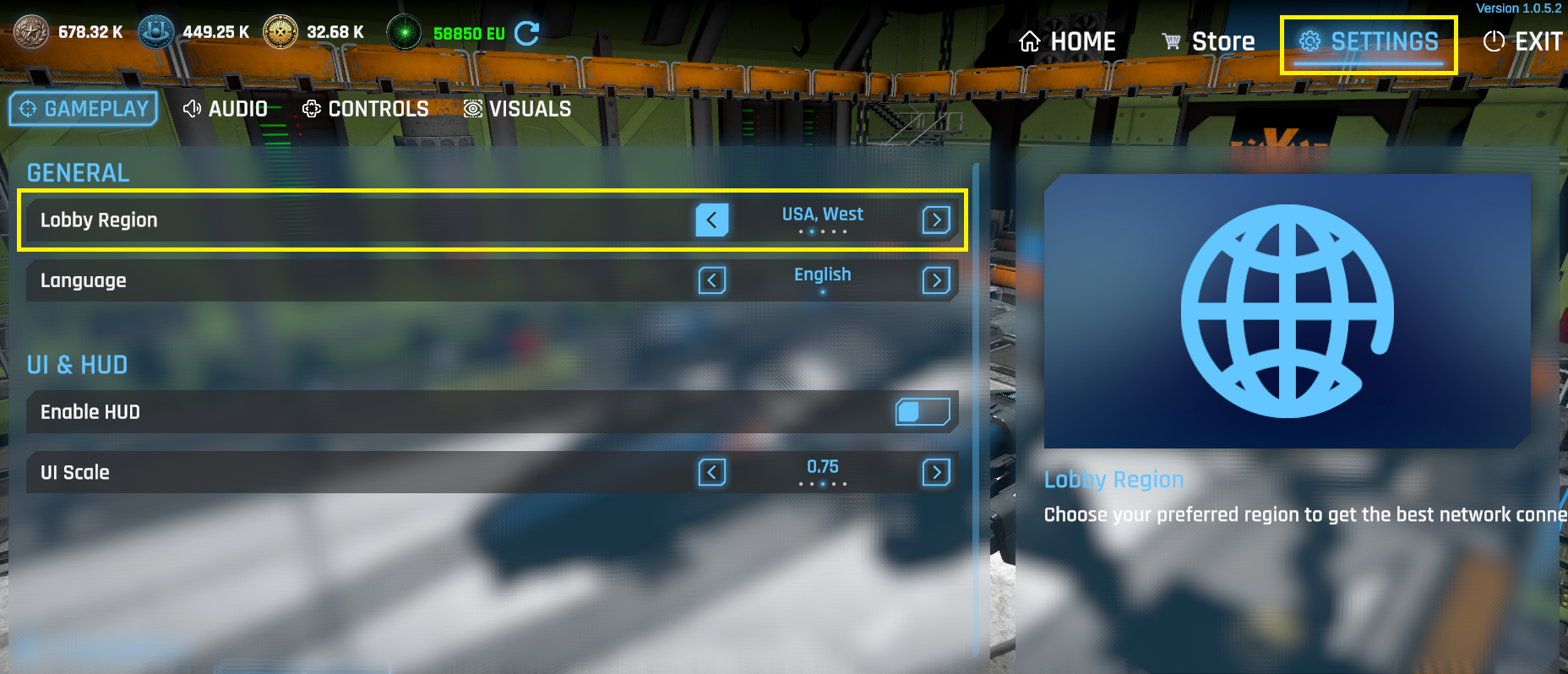
If you want to improve the networking performance, please pick the nearest region to your location. To do it so go to the EXTERMINIUM LOBBY (HANGAR) click on the SETTINGS menu, then click on the GAMEPLAY Tab, there you will see a label with the Lobby Region click on the switch arrow to change the region. The default region is USA South Central, change it at your convienience.
The EXTERMINIUM GAME is a Multiplayer space battle game where the player can join to a human or alien team, the human team defends the city and the alien team protects the MotherShip to be destroyed.